Items LOV is Empty in Redwood UI for
Inventory Transactions
Issue Description:
Sometime
users intermittently report an issue across several Oracle Fusion Redwood
pages, including:
·
Create Miscellaneous Transaction
·
Subinventory Transfer
·
Create Unordered Receipt
When
attempting to search for an inventory item, the Item List of Values (LOV)
sometimes returns no results, even though the item exists in the system with
correct configurations and org assignments.
As
a result, users are unable to select the required item and therefore cannot
create or complete the corresponding inventory transactions. This issue can
impact day-to-day warehouse and inventory operations and may lead to
transaction processing delays.

Resolution:
To ensure that items are correctly displayed in the Item LOV on Redwood
pages, perform the following configuration and validation steps.
1. Enable the Required Opt-In Feature
Verify that the Oracle Fusion opt-in feature "Search Items Using
the New User Interface" is enabled.
- Enable this opt in to
an offering in the Product Management > Items portion of the offerings.

2. Configure and Rebuild the Item Search Index
The
Redwood item search functionality relies on the item index. Ensure that the
index is properly configured for Inventory Management. This can be
done by going to the Product Management heading in the navigator bar> Show
More > Configure Application > Indexes.
1. Click
the Item Index

2. Click the 3
Dots in the upper right -> Enable attribute sets

3. Enable for
Inventory Management.
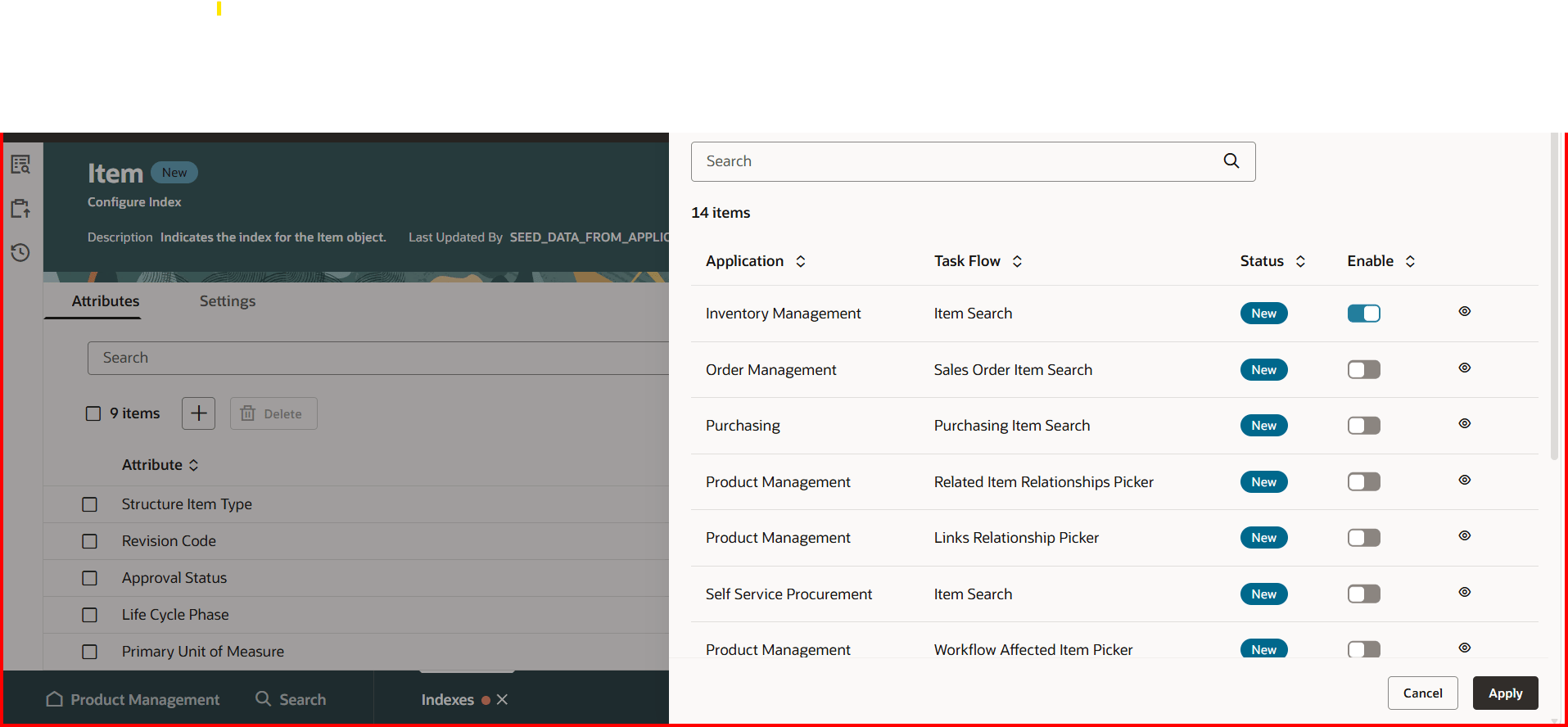
4. Once this is
done, the Index needs to be rebuilt.
5. Click Save
6. Click the 3
Dots -> Rebuild -> Schedule for Now

This will generate a scheduled process.
Once the jobs are done, users need to log out and back in, and the items
will be visible in the LOV.

Important Note:
To configure and rebuild the index,
the user must have the privilege EGP_ACCESS_LANDING_PAGE_PRIV added to
the role.
This privilege is available in the
standard roles Product Manager and Product Data
Steward. You can add these roles to the user ID and Run LDAP programs.
1. Send Pending
LDAP Requests
2. Retrieve
Latest LDAP Changes
3. Import User
and Role Application Security Data


No comments:
Post a Comment